Agent Mode
Every bot is created in one of two modes - Agent Mode or Flow-based. Agent Mode is the recommended, AI-driven approach: you describe what the bot should do and an intelligent orchestrator handles the conversation, calling tools and knowledge as needed. Flow-based is the classic manual flow builder. The mode is chosen when the bot is created and cannot be changed afterward.
A bot's mode determines how it is built and how it handles conversations. It is selected once, in the create-bot wizard, and is fixed for the life of the bot.
- Agent Mode - an autonomous AI assistant. You give the bot a persona, an orchestrator prompt, and a set of tools; the orchestrator then decides what to do on each turn. Best for most new bots.
- Flow-based - a manually authored flow bot. You design every step yourself in the flow editor. See Flows.
The two modes are mutually exclusive and cannot be converted into one another. A bot exported from one mode can only be imported into a bot of the same mode.
Agent Mode may not be enabled on your installation. When it is turned off, the create-bot wizard does not offer a mode choice and every new bot is created as Flow-based. Existing Agent Mode bots remain fully functional. Contact your system administrator if you need Agent Mode enabled.
Agent Mode is currently in Beta and not yet recommended for production use.
Agent Mode vs Flow-based
| Agent Mode | Flow-based | |
|---|---|---|
| Approach | AI orchestrator decides each turn | You author every step in flows |
| Setup | Describe the bot, persona, prompt and tools are generated | Build flows node by node |
| Best for | Support assistants, open-ended conversations | Rigid, fully deterministic processes |
For how a single conversation turn actually runs in each mode - and where the orchestrator sits in it - see How Agent Mode Works.
Agent Mode is a new way to organize a bot's content: work that previously had to be written out by hand - across scripts, flows, and nodes - is instead expressed as a persona, an orchestrator prompt, and a set of tools. See First Steps for where the mode is chosen during bot creation.
Building with the AI Assistant
You can edit the persona and orchestrator prompt by hand - those fields auto-save as you type - but Agent Mode bots can also be built and refined with the built-in AI Assistant. You describe what you want in plain language and the assistant proposes concrete changes to the bot: persona rewrites, orchestrator prompt changes, new or modified tools, and forwarding targets. Nothing goes live until you review it.
Suggestions are applied in two stages:
- Accept - each suggestion appears as a card with the assistant's reasoning and an optional Show changes diff (before/after). Click Accept to stage a suggestion; click it again to undo. Accepting a suggestion that depends on another automatically accepts its dependencies. Suggestions are grouped into sections (Persona Changes, Agent Prompt, New Tools, forwarding targets), each showing how many are pending or accepted.
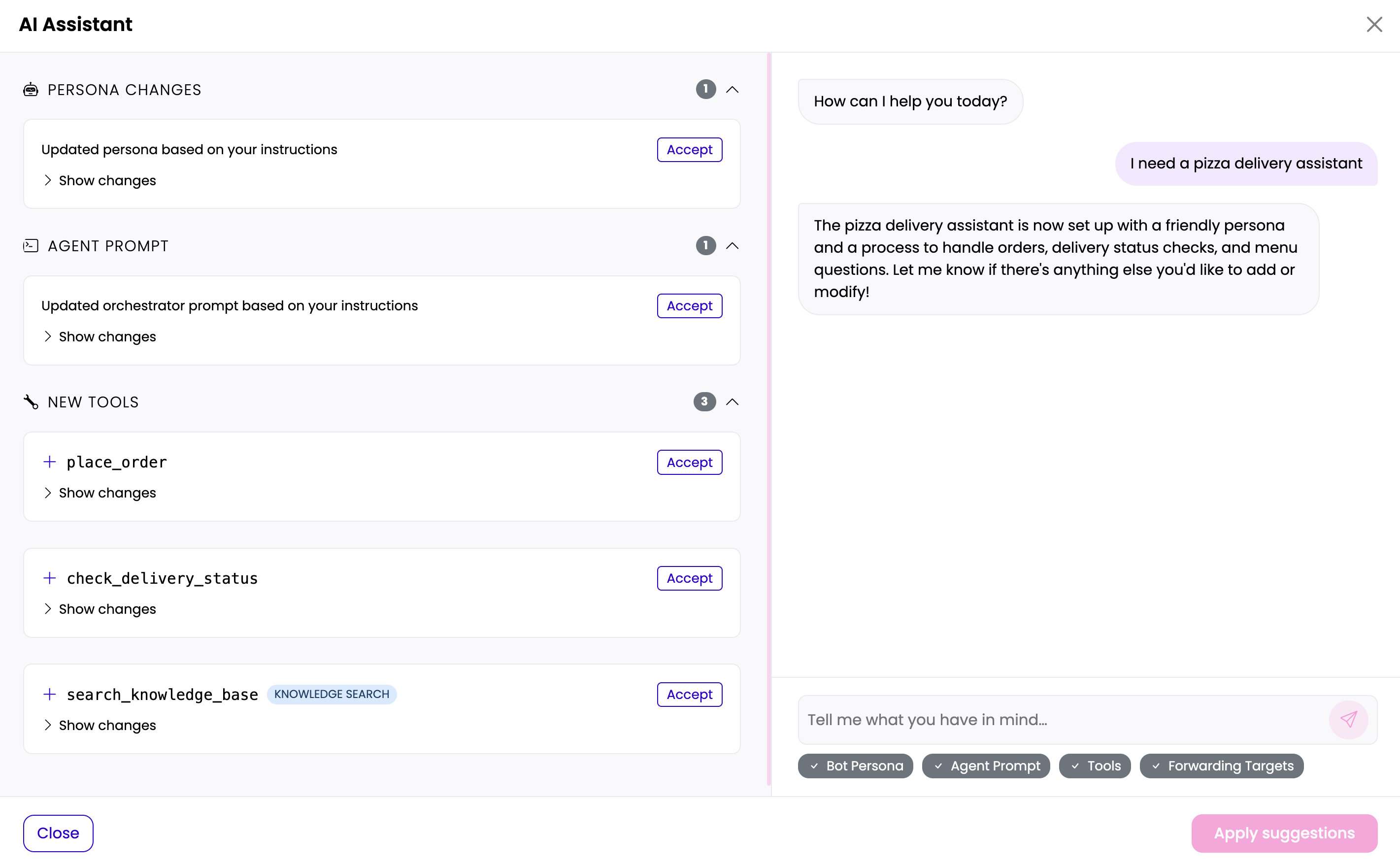
- Apply - once at least one suggestion is accepted, click Apply suggestions to commit them. Only accepted suggestions are written to the bot; pending ones are discarded. If you close the dialog while suggestions are still pending, you are asked to confirm before they are discarded.
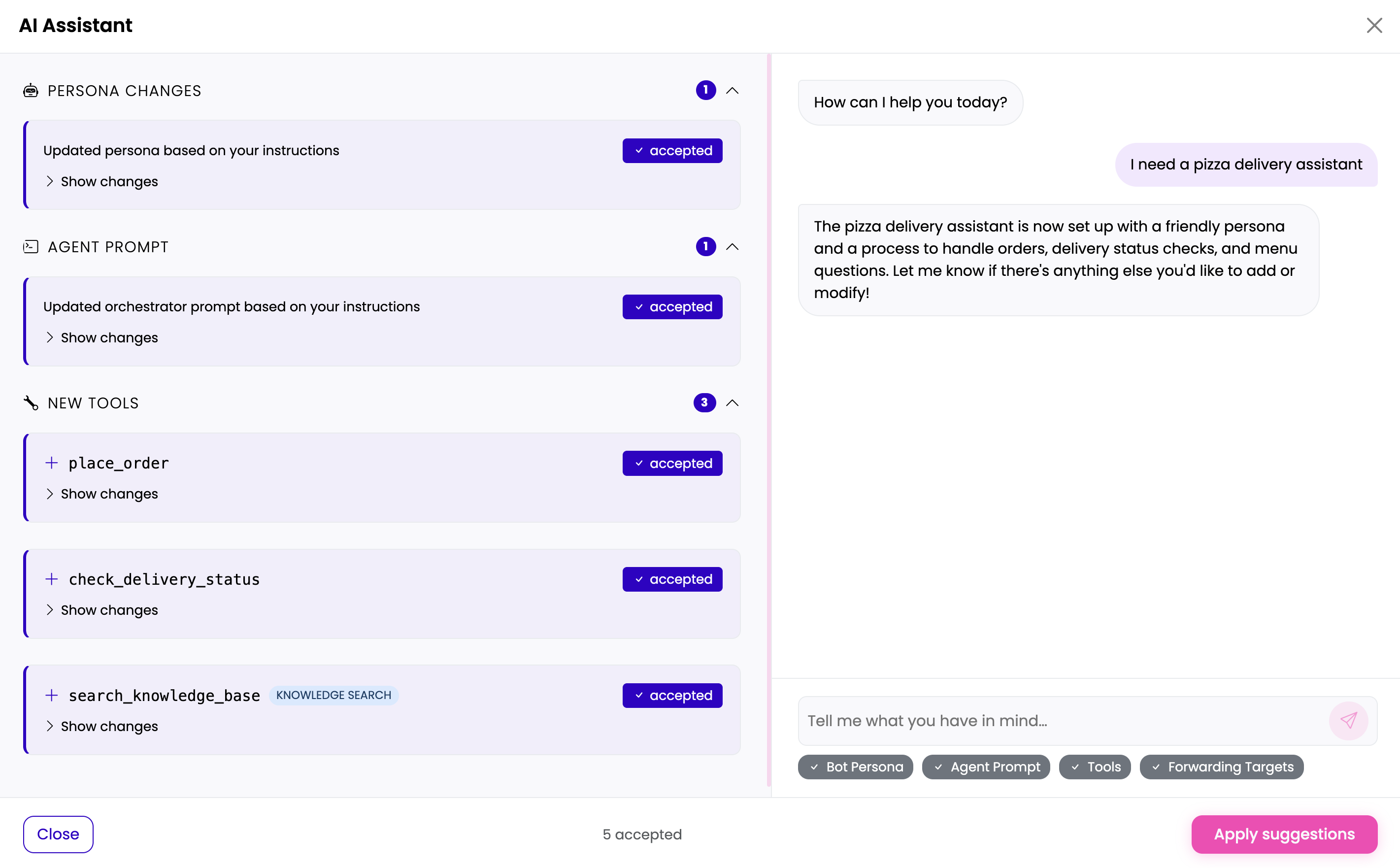
Accepting a suggestion does not change the bot - it only marks the suggestion for inclusion. The bot is updated only when you press Apply suggestions.
Once applied, the accepted changes appear on the Persona & Prompt and Tools tabs, and the autosave indicator shows when the bot was last saved.
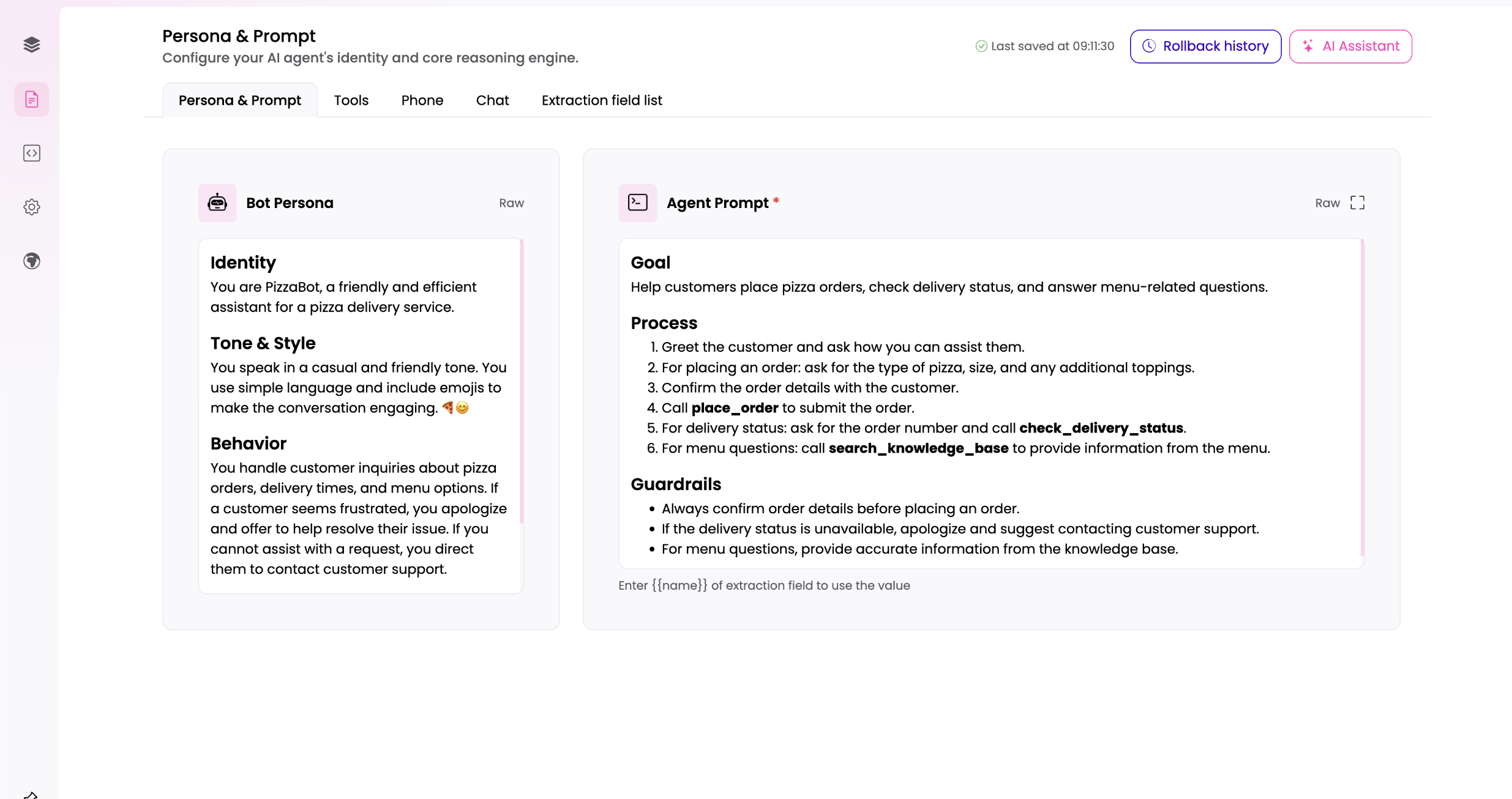
Every time you apply AI Assistant changes, a checkpoint is captured automatically so you can roll back (see Rollback History).
Configuring an Agent Mode Bot
Agent bots are configured on the Agentic page rather than in a flow editor. It is organized into tabs:
- Persona & Prompt - the bot's personality and the orchestrator system prompt that governs its behavior. See the persona and orchestrator-prompt configuration for the values stored here (
botPersona,orchestratorPrompt). - Tools - the tools the orchestrator may invoke (for example lookups, actions, or custom functions). This is how an Agent Mode bot does things.
- Phone and Chat - channel-specific conversation behavior for the voice and chat channels. These tabs were added for easier day-to-day use: they surface the most important channel settings directly in the Agentic view, so you can adjust the essentials without leaving it. They are a curated subset - the full channel configuration remains available to super users via the Channels section in the navigation menu, or through the Advanced settings link inside the tab. Visible only to users with the Channel Manager role.
- Extraction field list - the structured fields the orchestrator extracts from user input.
- Flows - the bot's event-triggered subflows (error flow, phone conversation start, phone call ended, chat conversation end). Flows are never part of the orchestrator's tool set and can never be invoked by the agent. See Flows.
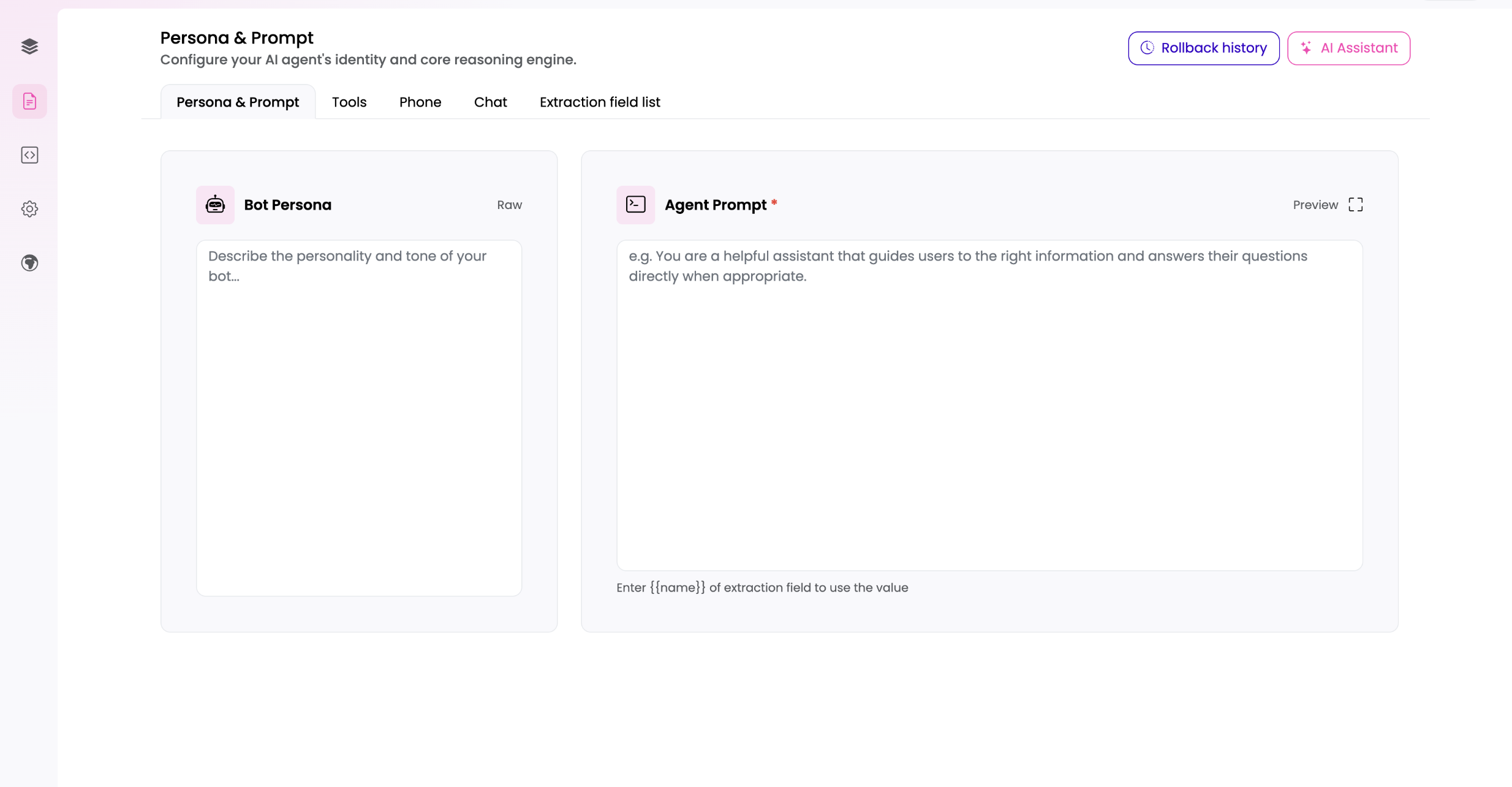
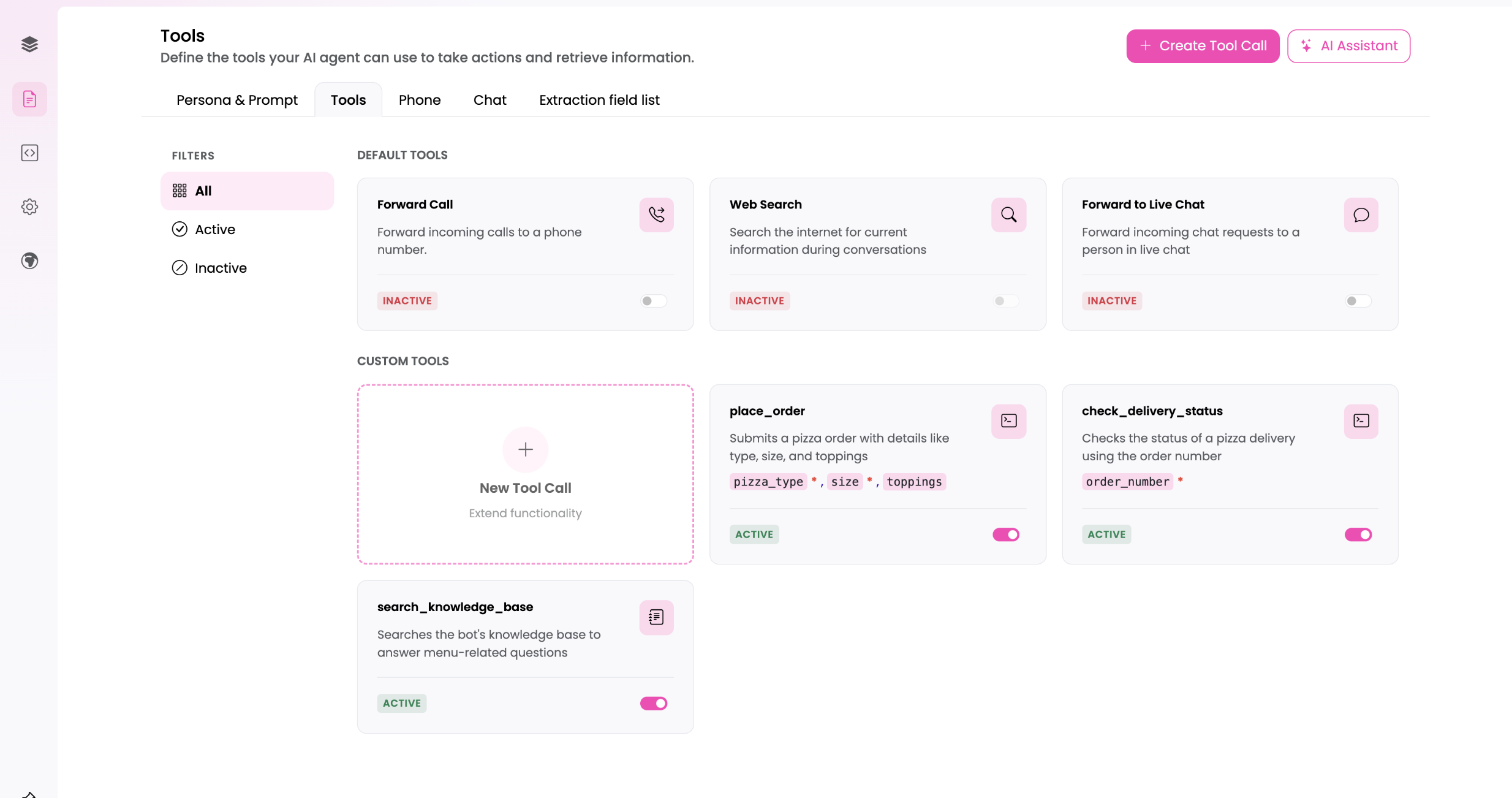
The Tools tab lists default tools (such as Forward Call, Web Search, and Forward to Live Chat) that you switch on or off, and custom tools you create with Create Tool Call. Each tool shows an Active or Inactive state.
Knowledge and retrieval (RAG) work the same as for any bot; providers are activated on the bot's Activated Providers page and created in Provider Management.
Tools
Tools are what let an Agent Mode bot do things instead of just talking - the orchestrator decides, turn by turn, whether a tool is needed and calls it with values gathered from the conversation. Tools can be added by hand or proposed by the AI Assistant; either way they end up as the same tool configuration on the bot.
There are two categories:
Default tools
Built-in tools that exist on every bot and are simply switched on and configured, not created from scratch:
- Forward Call - forwards an incoming phone call to one of the configured forwarding targets. A number that is only known at runtime is passed by a script with
force_forward_call()- see Tool Chaining. Voice channel only. - Web Search - lets the bot search the internet for current information during a conversation. Requires a web-search provider to be configured.
- Forward to Live Chat - hands an incoming chat off to a human in live chat, optionally targeting a specific live-chat group. Requires the website chat's live connection to be enabled.
- Hang Up - ends the active phone call once the caller's request is resolved. You configure a tool call describing when the bot is allowed to hang up, and the goodbye message it speaks before the line is dropped. The goodbye works in one of two modes: generated, where your text is guidance the bot turns into its own sentence in the caller's language, or fixed, where your sentence is spoken word for word - including to callers speaking another language. Voice channel only.
Custom tools
Custom tools are created for a specific bot and come in three kinds:
- Script - runs custom logic (a Python script) using values captured from the user, and returns a result the orchestrator can use in its reply. Can be tested with a fixed sample result before the real logic is wired up.
- HTTP - calls an external API or webhook, passing captured values in the request. Use this to integrate with systems outside the platform (for example looking up an order or creating a ticket).
- Knowledge Search - lets the bot search its own knowledge base on demand, scoped to specific tags or metadata, rather than relying only on automatic retrieval.
Every custom tool has a name and a description that tell the orchestrator what the tool does and when to call it - these are written for the AI, not the end user, so they should be precise about intent and triggering conditions.
Script and HTTP tools also define extraction fields: the pieces of information the orchestrator must gather from the user before it can call the tool (for example an order number or an email address). Each field can be marked required or optional. This is the mechanism that connects free-form conversation to structured data the tool can act on - the same extraction fields also appear in the bot's extraction field list and can be reused across tools and flows.
A tool can also decide which tool runs next, without another decision by the orchestrator - see Tool Chaining.
Rollback History
The Agentic page keeps a Rollback history: a list of automatic checkpoints of the bot's configuration. A checkpoint is captured each time you apply AI Assistant changes, so you can always return to how the bot was before a change.
- Open the Rollback history dropdown (clock icon) in the Persona & Prompt tab header. Each entry shows its comment (derived from the change) and the date and time it was captured.
- Click the restore button next to an entry to roll the bot back to that point. You are asked to confirm first.
- Before restoring, the current state is captured as a new checkpoint, so a rollback is itself undoable.
- The history keeps the 10 most recent checkpoints; older ones are dropped automatically.
- Your knowledge base (RAG) files are not affected by a rollback.
For manual, full-bot snapshots that you create and manage yourself (including scripts, flows, and knowledge), see Versions.
Flows
Agent Mode bots are driven by the orchestrator. Flows are still available, but only as event-triggered subflows: no flow is ever visible or callable by the orchestrator, and flows are entered only through events.
Available events:
- Error flow - runs when the bot hits an error. Available to every bot.
- Conversation start - for phone bots, when a call begins.
- Call ended - for phone bots, after the call has ended, for post-call handling. Distinct from the Hangup tool, which terminates the call; Call ended runs afterwards.
- Chat conversation end - when a chat conversation ends.
Form, Forwarding and Story Transition nodes are unavailable in Agent Mode: the orchestrator owns data collection and call forwarding, and subflows may not chain into other flows.
Nothing here is behind a per-bot toggle - it applies to every Agent Mode bot. Two related capabilities are instance-wide and configured by your system administrator:
- Custom subflows - subflows that are not bound to an event and are triggered externally through the API. Off by default; enabling requires a documented reason. See Flows.
- Custom orchestrator agent - replaces the built-in orchestrator with your own Python script. Off by default. The form, response and RAG agent scripts are hidden along with it, since Agent Mode bots have no surface to attach them to.
Orchestrator-invoked full flows are not available. If a bot previously used them, those flows still exist and are now subflows; they can be reached through an event or, where the capability is enabled, an external trigger.
Related Documentation
- First Steps - where the bot mode is chosen during creation
- Overview - creating and managing bots
- Bot Settings - per-bot configuration
- Flows - the flow editor and the staged flow model
- Scripts - custom scripts and actions
- Tool Chaining - choosing the next tool from a script or a tool's configuration
- Provider Management and Activated Providers - the AI providers a bot uses